The #1 mobile app platform worldwide
The #1 mobile app platform worldwide
Mar 18th

By now, you’ve probably heard of geofencing – you may have even experienced it for yourself – but you may still have some questions about how it works, and more importantly, how it can work for your business.
Let’s hit the basics first. Your business can easily build an app with an online app builder, and ask customers and fans to download it. One of the possible functions you can include in the app is geofencing. (Available early April 2014)
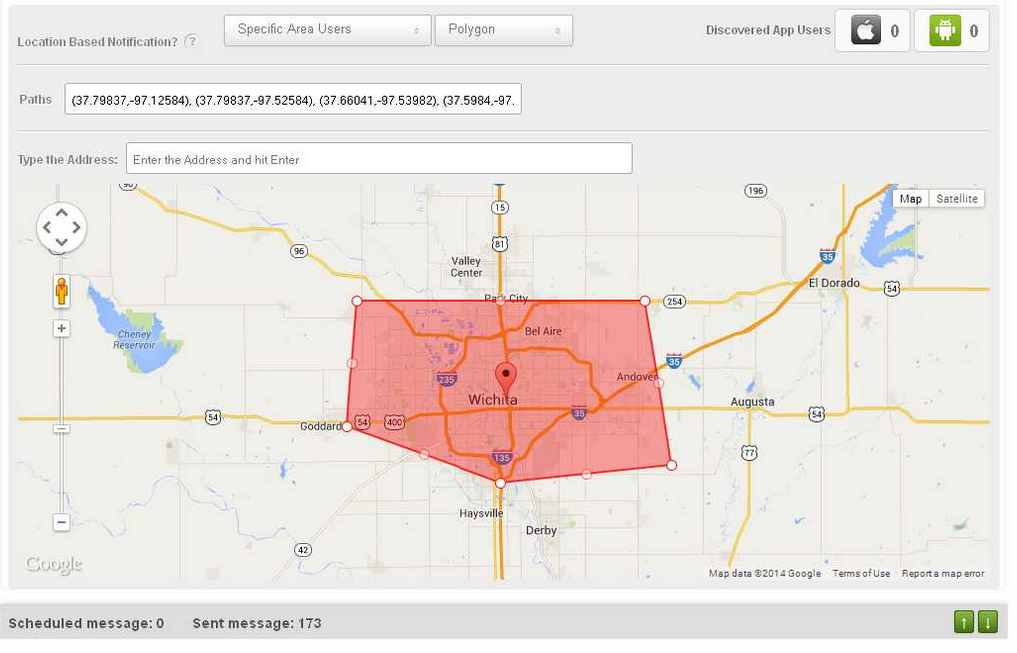
Geofencing is the establishing of a virtual fence around a predefined geographic area. When one of your app users enters or exits the area, you can set your app to push a message to the user. Thus, the geofence allows you to send location-specific messages to your fans when they’re in the area.
How is geofencing used?
Many businesses use geofencing to simply send special offers to customers when they walk or drive near a business’s location. Beyond that, however, lays a ton of variety. For example, real estate agencies can push notifications to possible buyers when they come near open houses, and bands can send messages to fans when they walk by a concert venue the band will be performing at soon.
But businesses are not limited to using their own locations!
A law firm could, if it wished, send a notification to a user when he or she entered a bail bonds office. A coffee shop could trigger a notification when a fan walked into another coffee shop. A wedding planner could trigger notifications when fans travel into various wedding-related venues, and offer helpful tips.
The possibilities are quite broad, and many businesses are still exploring them. If you’re creative, geofencing can open up a lot of interesting new possibilities for your business.
When it comes to the radius of your main geofence, smaller is better
It’s clear that businesses can set the radius of their main location’s geofence to whatever size they wish, but what’s the right size? Well, a citywide radius obviously won’t help much – it lacks the convenient linkage between message and proximity to the sender. Instead, if your business has a lot of competition, it’s best to focus on your own backyard. Literally. Keep in mind, however, that if you’re the only game in town, a bigger radius is fine.
Other key considerations
Geofencing is not just about bombarding users with messages whenever they go places. If you do that, they’ll opt out of your messaging altogether or delete your app. Instead, the customer has to come first. Always consider whether or not you would want to receive your messages as a hypothetical user, and think about the value your program provides.
To accomplish this, don’t think of geofencing as just another way to sell to your audience. Instead, use it as an organic way to connect and add value. You wouldn’t want your favorite companies exploiting every channel to boost sales, but if they pop up every now and then with something timely, relevant, and useful, it can be kind of neat.
Therefore, your goal should be to use your geofence messages to improve your customers’ experiences, and provide them with benefits. If you can do that, while also driving traffic to your location and activity on your promotions, so much the better. But remember that if you want your geofencing program to be a success, put the customer ahead of yourself.
Do that, and the rest will fall in place.
Mar 14th
The heart of geofencing is exactly what it sounds like – a virtual fence around a geographic area. Establishing a geofence and linking it to a mobile device like a smartphone allows you to know when a person has entered or exited the defined geofenced location.
For most small businesses, this information is used to trigger a push notification to the person.
Example 1 - Dry Cleaner.
A dry cleaner in a city establishes a two-block radius geofence centered on its main location. The dry cleaner’s customers have downloaded its app, and are trackable in the dry cleaner’s system. When a customer carrying their mobile device enters the geofenced area, a push notification comes up reminding him or her that an order is ready for pickup. Customers love the reminder, and never forget their orders, and the dry cleaner is able to offer a value-add that doesn’t take up any extra manpower or energy.
Example 2 - Bakery.
A trendy bakery is cooking up mega-batches of a new cookie. To help spread the word and get feedback, the bakery sets its geofence notification to invite fans to come in for a free sample. Not only do they get all the info they need on their new cookie recipe, they drive a ton of traffic and sell out their case of cakes, too!
Example 3 - Real Estate Agent.
A real estate agency has an app that active searching buyers often download. The agency can establish a geofence around its listings when they are holding open houses. When a potential buyer enters the geofenced zone, they get a notification of the open house, and head over to check it out if interested.
The Flexibility of Geofencing
A geofence can be set at nearly any distance you like. You can include an entire city, or you can have it extend just out to a sidewalk in front of your location. GPS technology is quite sensitive, and therefore, so is geofencing.
As you can see from the examples above, push notifications triggered by geofences also don’t have to just be messages about deals, they can cover lots of different things for lots of different purposes. In fact, the message can include a link to any location on the web, including a page you design specifically for a particular campaign. Therefore, geofencing may have applications for a wide variety of small businesses. How to deploy it, and make it serve your needs, is up to you.
The geofence doesn’t even have to be centered on your location. If you have a pizza joint, and want to trigger a message to your fans as they leave the bar, you can. There are many creative ways to use geofences.
Who Benefits?
Geofencing obviously can be used to drive traffic to your business. That’s the benefit to you. But you also have to keep your customers in mind. Geofencing needs to be used to improve their experiences and deliver value, or they won’t keep it enabled.
You can also use geofencing to gather data about customers and study their behavior to understand them better. This information can help you evaluate the effectiveness of ads, store layout, and lots more.
Geofencing is definitely an idea whose time has come. If you want to learn more about creating your own mobile app with geofencing, head here.
Mar 13th
 We can go on and on about how apps can bring huge benefits to your small business, but one thing remains true – if you don’t help your app, it won’t help you. This isn’t to say that apps require tons of maintenance, or that you need to be worrying over your app at all hours of the day. But if you don’t use best practices and proven strategies, you won’t maximize the opportunities your app can create.
Today’s lesson is about push notifications.
What are they?
For those who don’t know, push notifications are the short messages that apps on your mobile device send you from time to time. They can mention new features, discuss special offers, share other information, or invite you to take an action. You’ve likely already experienced push notifications as an app user. Now it’s time to learn how to use them as an app owner.
Why bother with push?
Glad you asked! Here are two quick answers, thanks to Urban Airship’s 2013 Good Push Index (which studied 2,400 apps and analyzed the ultimate effects of 500,000,000 push messages):
1. Push increases app user retention rates by an average of 100%
2. Use of push leads to an average of 26% more monthly opens
That is, if you use push notifications at all, then on average, you’ll keep twice as many users and they’ll be significantly more engaged. If you’ve bothered to publish an app, why not take the next step and use push to boost key success metrics and get your money’s worth?
Rhetorical question. Almost every app can benefit from intelligent use of push!
People hate spam. Will anyone opt-in to my push notifications?
Not to worry. For those who do it right, opt-in rates are very high. Here were the best performers that Urban Airship studied (so you know where the ceilings are):
Best Media App: 96% opt-in rate
Best Retail App: 90%
Best Business App: 87%
Best Sports App: 75%
Best Gambling App: 60%
We know – you’re not expecting to do that well. That’s fine – average rates were in the 40-50% range. But if just half of your users opt-in to push, you’ll create a new, highly engaged, highly valuable user segment that can help you generate huge returns.
So how do I “do push” right?
Each type of app will need a different push strategy that is designed to provide users what they want at the times they want it. For some businesses, push may be a core part of your offering, especially if you deal in following current developments. For others, it will be a matter of finding the right offers, discounts, event notifications, new product messages, and other items to generate value for users.
As always, our advice is to put the user first. Before you set a push notification to go out, ask yourself, “If I were a user, how would I react to this message?”
The rest is experimentation.
Mar 7th
 Push notifications are an amazing tool for small businesses that want to boost revenue. Their conversion rates are through the roof, the response time is super-fast, and the cost is minimal.
Using push notifications, businesses can reach users anywhere, anytime with targeted, relevant messages that drive action.
Unlike mailers and ads, which are costly and may not necessarily hit the mark, push notifications are easy to create (they can be as simple as a single sentence), and can generate immediate results.
Some businesses, however, have made mistakes and turned users off with spammy push notifications. This represents a failure to follow one of the main rules of mobile technology.
When and where matter
Push notifications shouldn’t be sent at random times on the theory that the message will get across no matter what and users will take whatever action they like. It simply isn’t true. There are better times to send certain messages. Experiment to find what works best for your company.
This also applies to geographic concerns. Because you can use geo-fencing to trigger push notifications when users are near your location, you also want to consider the right places to send messages. Users may be much more responsive to certain messages and offers when they’re very close to your location, as opposed to far away.
Give them what they want, not what you want
This ultimately drives the success of all promotions and communications. You need to focus on content that users are interested in, and that they find valuable. If you start from there, you won’t go too far wrong. If you start, on the other hand, with your own wants and needs, you can go very far wrong.
Keep the user in mind, and your notifications will become welcome communications that users want to take action on. When that happens, you’ll unlock the full power of push.
Learn more about the most advanced push notification system available here.

Aug 16th
 If you haven’t been sending out push notifications from your business’s app, you’re missing out on one of the most effective ways to get users actually using your app.
A push notification is a message that a user gets on the home screen of their mobile device. Push notifications emanate from apps, and can be turned on or off at a user’s request. They sound simple and boring, but get this: it has been reported that push notifications can lead to:
• A 540% increase in daily app opens,
• A 30% increase in social sharing, and
• A 20% percent increase in mobile orders.
In addition, the response rate is three times faster than email! Thus, if your app is going completely ignored on user’s devices, push notifications can totally revive it and help you make the most of your app investment.
“But wait,” you say, “Aren’t ‘pop-ups’ annoying to users?”
Good question!
Firstly, these aren’t shady pop-ups (the classic annoying pop-up occurs when you click one thing and then are treated to a window containing something completely different). Instead, these are text-only messages that arise only if a user already has your app. Secondly, as the stats above show, they’re quite effective, but you have to deploy them in the right way.
How do you do that? Glad you asked. Here are the keys to doing push right:
1. Give the user control
This is more important than anything else.
Your app must give the user the power to opt out of your notifications. Users that don’t want notifications will delete your app the second they get one – they’ll feel harassed by extra messages. So, you want to ask them right up front if they want notifications. And if they don’t, you want them to opt out and be left alone. If they use your app, great! If not, no amount of extra messages would improve the situation, we promise.
The remaining users that opt in to push notifications are now your core app audience. But they, too, have their limits. For them, you have to…
2. Make it relevant, then divide and conquer
Not every user is the same. Give each user a few options for the types of notifications they want to receive. Some want to hear about events, others about discounts, and others just want general news. If you can, let each user select the notifications that are most relevant to their interests. That way, you know that when you send out notifications, you’re sending out information that people actually want.
3. Be timely
If you’re using a sophisticated push system (like ours), you can schedule notifications to go out when they’d be most effective.
For example, you might handle social media planning each Monday, then dive into operations. But a Monday morning push isn’t right for every type of offer. If you’re a bar, for example, you want your “Fireball Friday” event push to go out sometime on Friday, probably. If, on the other hand, you’re a hiking expedition company, you might want to send a series of push messages over a period of weeks to members that have signed up for a big trip to remind them of various things.
The point is, if you schedule your push for the right time, and you’ll max out effectiveness and relevance to users.

Jul 24th
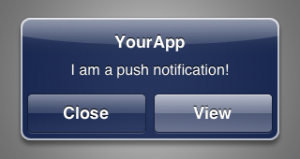 Push notifications are one of the keys to connecting with your fans and customers using your app. While users may not necessarily launch your app frequently, notifications can help you keep the lines of communication open, especially through offers, discounts, event alerts, and other strategies. That way, your app becomes a sounding beacon that helps you maximize bonds with your userbase.
Our new push notification system makes this process easier than ever before, while ensuring that your business looks really good each time customers see you on their mobile devices.
Here’s how it works:
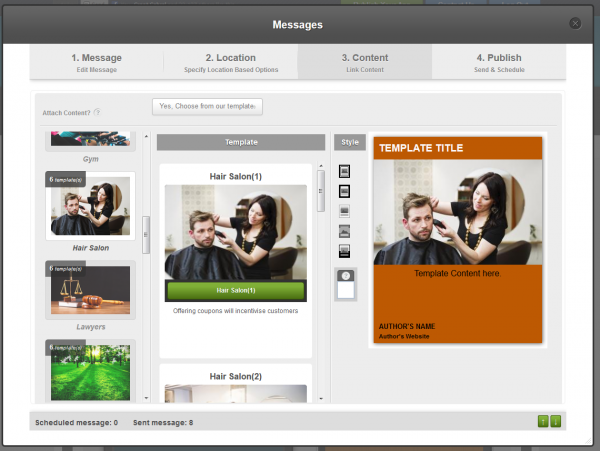
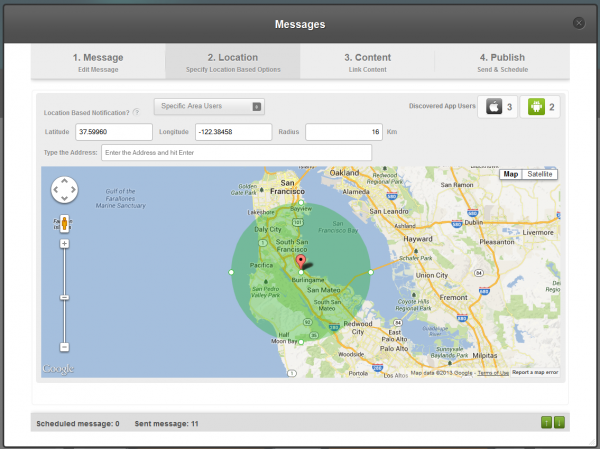
1. First, enter your push notification message at your BiznessApps dashboard online. This is just a simple piece of text that will let users know you’ve got something to share.
2. Then, choose the location you want to broadcast to (i.e. just your users in a particular neighborhood, or all your users throughout the entire world?)
Now the fun really begins…
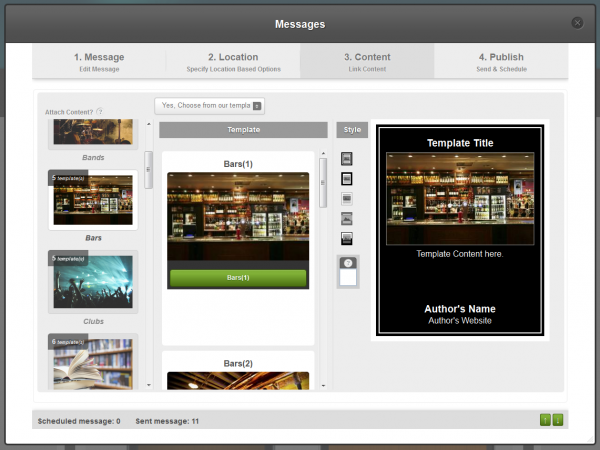
3. After choosing your location, you can select your offer template. We have a variety of professionally created, industry-specific images for you to pick from, as well as your choice of color scheme. This ability to customize offer templates is an advanced feature that we are very proud of, and that you simply won’t find anywhere else. Check out this demo video at 1:42 to see them in action.
4. Lastly, type in your offer text, and then set a date and time for sending. Now, you’re all set. Your offer is looking good and ready to help you drive some business!
Our push notifications also have a few extra features, just to sweeten the deal.
You can 1) sync your Facebook and Twitter accounts to the system, so that pushed offers are simultaneously posted to your social media pages, 2) choose what devices you message will go to (e.g. only Android users, or only iPhone users), and 3) send offers that contain a link to a URL or a tab within your app.
In short, our push notification system is one of the most advanced systems available, and it can be a major asset for boosting interaction with your users and increasing revenue.
Advanced Push Notes from Bizness Apps on Vimeo.
 Previous Blog Posts